13hours
51minutes
09seconds

New widget release

Your new favourite Notion accessory

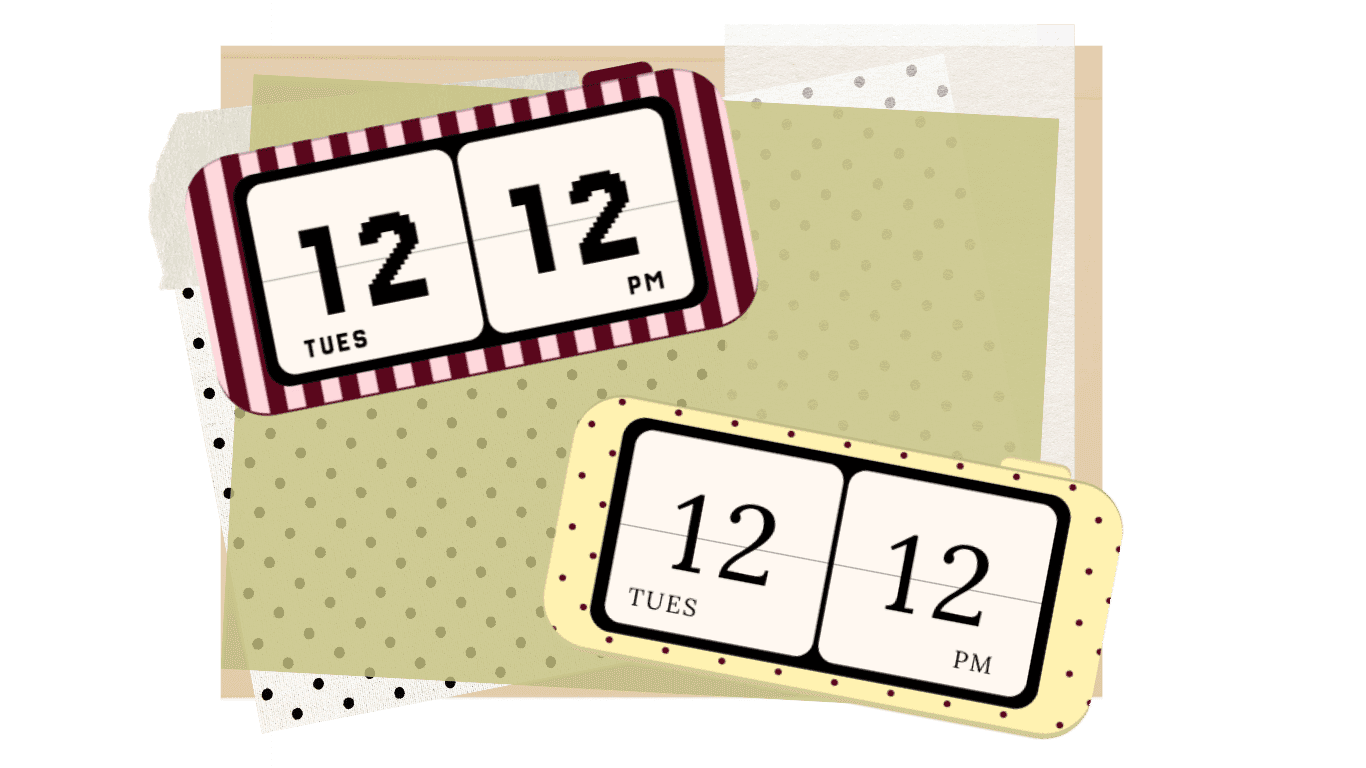
A customisable clock widget designed to make your workspace feel more chic and funtional.

New release

Your new favourite Notion accessory

A customisable clock widget designed to make your workspace feel more chic and funtional.

Aesthetic Notion Clock Widget

Because your Notion deserves to look cute too

Because your Notion deserves to look cute too

Because your Notion deserves to look cute too

Add a free aesthetic clock widget to your Notion dashboard in just a few clicks

Start with four free clock frames, or make it completely yours. Upgrade with one simple payment to unlock full customisation and a built-in Pomodoro timer, because your focus time deserves to look cute too.

Notion Pomodoro Timer

Give your focus time a stylish little upgrade

Your productivity boost, but make it cute.

Set your ideal focus and break times with a customisable Pomodoro timer that lives inside your Notion workspace.

Stay in your flow, take intentional breaks and get things done in a way that works for you.

Aesthetic Notion Clock Widget + Pomodoro Timer

Customise your aesthetic Notion flip clock with your favourite colours, fonts, clock faces and frames. You’ll also unlock a built-in Pomodoro timer with adjustable focus and break times.

£5

What's Included

Create unlimited Notion clock widgets

Custom Website Design

Customise colours, fonts and clock faces

Responsive Mobile Optimization

Lifetime access to the clock widget

Responsive Mobile Optimization

Unlock every new flip clock frame

Responsive Mobile Optimization

Most Popular

She Creates Widget Collection

Get lifetime access to every existing SheCreates widget and any new widgets released in the future, including the Instagram Grid Preview and Aesthetic Notion Clock Widget + Pomodoro timer.

£45

What's Included

Product lifetime access to all SheCreates widgets

Custom Website Design

Access to all future widget releases

Responsive Mobile Optimization

No recurring subscription

Responsive Mobile Optimization

Including unlimited Instagram Grid Preview access

Responsive Mobile Optimization

How it works

How does the pomodoro timer work?

How does the pomodoro timer work?

01 / Set your focus and break times

01 / Set your focus and break times

Choose the length of your focus sessions, short breaks and long breaks. When you’re ready, start your first focus session and get to work.

Choose the length of your focus sessions, short breaks and long breaks. When you’re ready, start your first focus session and get to work.

02 / Focus until it chimes

02 / Focus until it chimes

When your focus session ends, the timer will chime and remind you to take a well-earned break. Stretch, hydrate, go for a little walk or take a longer reset.

When your focus session ends, the timer will chime and remind you to take a well-earned break. Stretch, hydrate, go for a little walk or take a longer reset.

03 / Watch your productive day add up

03 / Watch your productive day add up

Move effortlessly between focus sessions and breaks right inside your Notion dashboard while the timer tracks your progress. By the end of the day, you’ll see exactly how much focused time you’ve achieved.

Move effortlessly between focus sessions and breaks right inside your Notion dashboard while the timer tracks your progress. By the end of the day, you’ll see exactly how much focused time you’ve achieved.

FAQ

Your questions, Answered

FAQ

Your questions, Answered

1. What is a Notion clock widget?

An aesthetic Notion clock widget is an embeddable clock that adds both function and personality to your Notion workspace. The She Creates widget lets you choose from four free clock frames, including a stylish flip clock design, or upgrade to create a more personalised look.

2. How do I add a flip clock widget to Notion?

Choose your preferred flip clock frame, copy the unique widget link and paste it into your Notion page. Select "embed", then resize and position your aesthetic clock widget to suit your dashboard. No coding is required.

3. Can I customise my Notion flip clock?

Full clock customisation is available when you upgrade. The free version gives you four preset frames to choose from, while the upgraded version lets you personalise your Notion flip clock and create a design that better complements your workspace aesthetic.

4. Is the aesthetic Notion Clock Widget free?

Yes. The one free Notion Clock Widget includes four ready-to-use clock frames, so you can add an aesthetic clock to your workspace without paying. You can upgrade if you want to customise the design or unlock the built-in Pomodoro timer.

5. What is the best aesthetic clock and Pomodoro widget for Notion?

The best Notion clock widget should complement your aesthetic while helping you manage your time. The She Creates widget combines an aesthetic flip clock with an optional Pomodoro timer, giving you a simple and sleek way to personalise your workspace and stay on track.

6. Can a Notion clock widget help me be more productive?

Yes. A Notion clock widget keeps time visible while you plan and work, and the Pomodoro upgrade helps you divide tasks into focused sessions and intentional breaks. It brings your planning and time management together in one place, making it easier to stay organised and on track.

1. What is a Notion clock widget?

An aesthetic Notion clock widget is an embeddable clock that adds both function and personality to your Notion workspace. The She Creates widget lets you choose from four free clock frames, including a stylish flip clock design, or upgrade to create a more personalised look.

2. How do I add a flip clock widget to Notion?

Choose your preferred flip clock frame, copy the unique widget link and paste it into your Notion page. Select "embed", then resize and position your aesthetic clock widget to suit your dashboard. No coding is required.

3. Can I customise my Notion flip clock?

Full clock customisation is available when you upgrade. The free version gives you four preset frames to choose from, while the upgraded version lets you personalise your Notion flip clock and create a design that better complements your workspace aesthetic.

4. Is the aesthetic Notion Clock Widget free?

Yes. The one free Notion Clock Widget includes four ready-to-use clock frames, so you can add an aesthetic clock to your workspace without paying. You can upgrade if you want to customise the design or unlock the built-in Pomodoro timer.

5. What is the best aesthetic clock and Pomodoro widget for Notion?

The best Notion clock widget should complement your aesthetic while helping you manage your time. The She Creates widget combines an aesthetic flip clock with an optional Pomodoro timer, giving you a simple and sleek way to personalise your workspace and stay on track.

6. Can a Notion clock widget help me be more productive?

Yes. A Notion clock widget keeps time visible while you plan and work, and the Pomodoro upgrade helps you divide tasks into focused sessions and intentional breaks. It brings your planning and time management together in one place, making it easier to stay organised and on track.

Made for hot girls who Notion

She Creates Newsletter

She Creates Newsletter

Join 930+ other Hot Girls Who Notion for the coolest tips and be the first one to hear about new launches.